
CORE UNIQUE
Controlled, soft-knee compression with manual or automatic release. The CORE starting point for shaping the performance.
Decision Audio / CORE 06
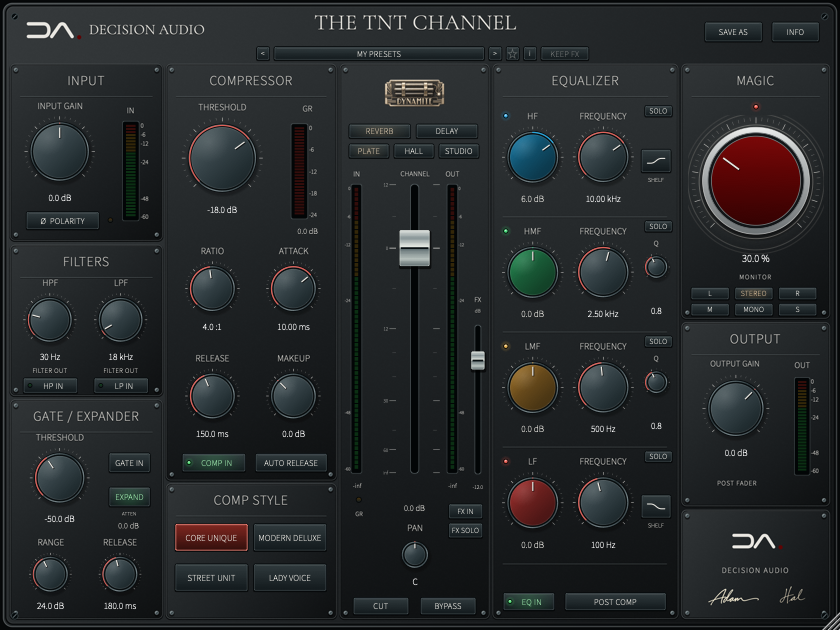
Filtering, dynamics, four-band EQ and the finishing touch of MAGIC in one CORE channel strip. Choose a compressor character, shape the balance and place the EQ before or after compression. The decisions stay with you.
Current Mac build · 1.1.2
Sales, trials and public downloads are not open yet.
Inside the current build
Start at zero and turn to taste. Let the part guide you, then compare with MAGIC at zero, using output trim to keep the listening level similar.
Turn either filter clockwise to remove more. HP raises the cutoff and rolls away the lows; LP lowers the cutoff and rolls away the highs. CUT BELOW and CUT ABOVE sit beside precise, editable frequency values.
Shape the ends with switchable shelves or bells, then work the middle with two parametric bands. Place the EQ before or after the compressor to choose how tone and dynamics interact.
Set threshold, range and release to control the space between notes. Choose gating or a gentler expansion response to suit the performance.
Input and output trim, polarity, pan or stereo balance, a long fader and CUT complete the strip. Peak meters and dedicated gain-reduction displays keep its action visible.
Four compressor characters
Four original dynamic behaviours, with the main controls in the same place.
Controlled, soft-knee compression with manual or automatic release. The CORE starting point for shaping the performance.
A broad knee and a ratio that develops as the signal pushes harder. Smooth control with a progressive response.
Fast, firm compression for a more forward response. Reach for it when the part needs to speak with more urgency.
Programme-dependent levelling with fixed attack and ratio, and a longer recovery component for a steadier performance.
Compatibility & support
Mac versions run in compatible AU/VST3 hosts. Windows versions are being prepared for launch; system requirements and supported formats will be confirmed before release.
A perpetual licence lets you activate up to two computers. Connect to the internet to sign in and activate; your saved licence then works offline.
Account, activation and quick-start guidance in English, Spanish, French, Portuguese, Japanese, Simplified Chinese, Korean, Hebrew and Arabic.
Already own a product? Open My products for your installers, English manuals, nine-language quick starts and customer support.
No new purchase or public trial is available while we prepare for release.
Independent product installers include the Decision Audio activation app. You do not need to reinstall your whole collection to add another product.
Install your product and open Decision Audio. Select the product, choose Activate and sign in with the account that owns it. Returning from the email link completes activation automatically. Reopen your audio app and start making music.
The planned 14-day trial supports two computers sharing the same expiry. Reinstalling or adding the second computer does not restart it.