Mac and Windows.
Mac versions run in compatible AU/VST3 hosts. Windows versions are being prepared for launch; system requirements and supported formats will be confirmed before release.
Decision Audio / CORE 04
Build the guitar.
Weight for the riff. Room for the lead. Black Dog is a guitar production processor built around the part and its place in the record. Finish an existing amp or modeller track in RECORDED mode, or choose DRY DI for original pedal and amp characters.
Current Mac build · 1.0.0
Sales, trials and public downloads are not open yet.
Inside the current build
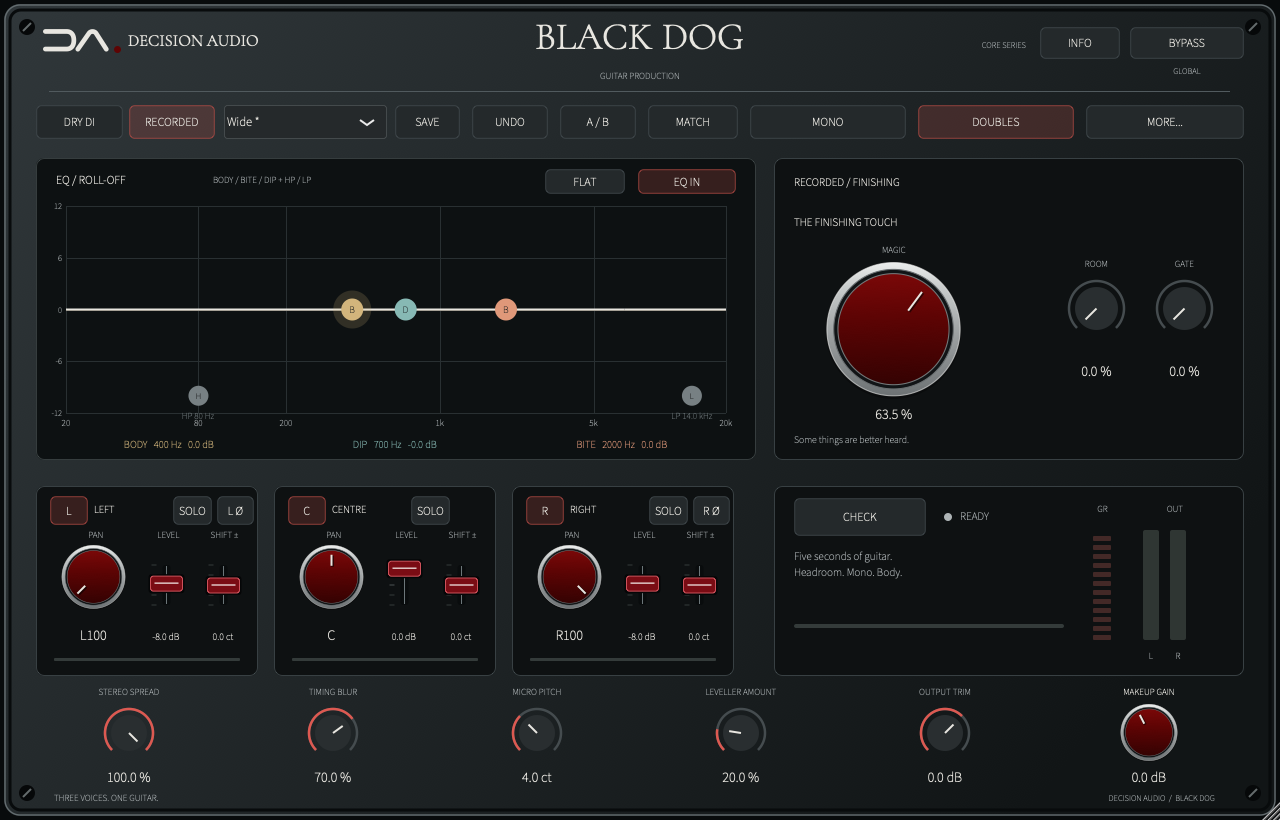
RECORDED keeps your existing amp and cabinet tone as the starting point and presents the finishing controls. DRY DI opens separate Pedal Bite and Amp Gain controls, nine original amp voices and cabinet shaping. An optional input gate is available in either mode.
Shape a centre voice and two derived side voices, each with its own pan, level and fine pitch shift. Timing Blur, Micro Pitch and Stereo Spread control their spacing and movement. SOLO isolates each voice; optional ROOM adds ambience around the combined sound.
BODY adds weight, BITE brings forward the attack and DIP creates a broad cut where the part needs room. Independent high- and low-pass filters extend the shaping at either end, with the EQ moves visible on the editable graph.
In RECORDED mode, the big red MAGIC control brings final note weight and sustain. Start at zero, bring it in by ear and judge the result in the arrangement. Its finishing character is tuned specifically for the recorded-guitar path.
The linked Leveller, Makeup and Output controls handle dynamics and level. Captured Match and A/B support comparisons; MONO auditions the full sum. CHECK measures a passage for sample overload and severe mono or body cancellation, ready for your review.
Compatibility & support
Mac versions run in compatible AU/VST3 hosts. Windows versions are being prepared for launch; system requirements and supported formats will be confirmed before release.
A perpetual licence lets you activate up to two computers. Connect to the internet to sign in and activate; your saved licence then works offline.
Account, activation and quick-start guidance in English, Spanish, French, Portuguese, Japanese, Simplified Chinese, Korean, Hebrew and Arabic.
Already own a product? Open My products for your installers, English manuals, nine-language quick starts and customer support.
No new purchase or public trial is available while we prepare for release.
Independent product installers include the Decision Audio activation app. You do not need to reinstall your whole collection to add another product.
Install your product and open Decision Audio. Select the product, choose Activate and sign in with the account that owns it. Returning from the email link completes activation automatically. Reopen your audio app and start making music.
The planned 14-day trial supports two computers sharing the same expiry. Reinstalling or adding the second computer does not restart it.